Frequently Asked Questions
Answers to your questions about the Findik app
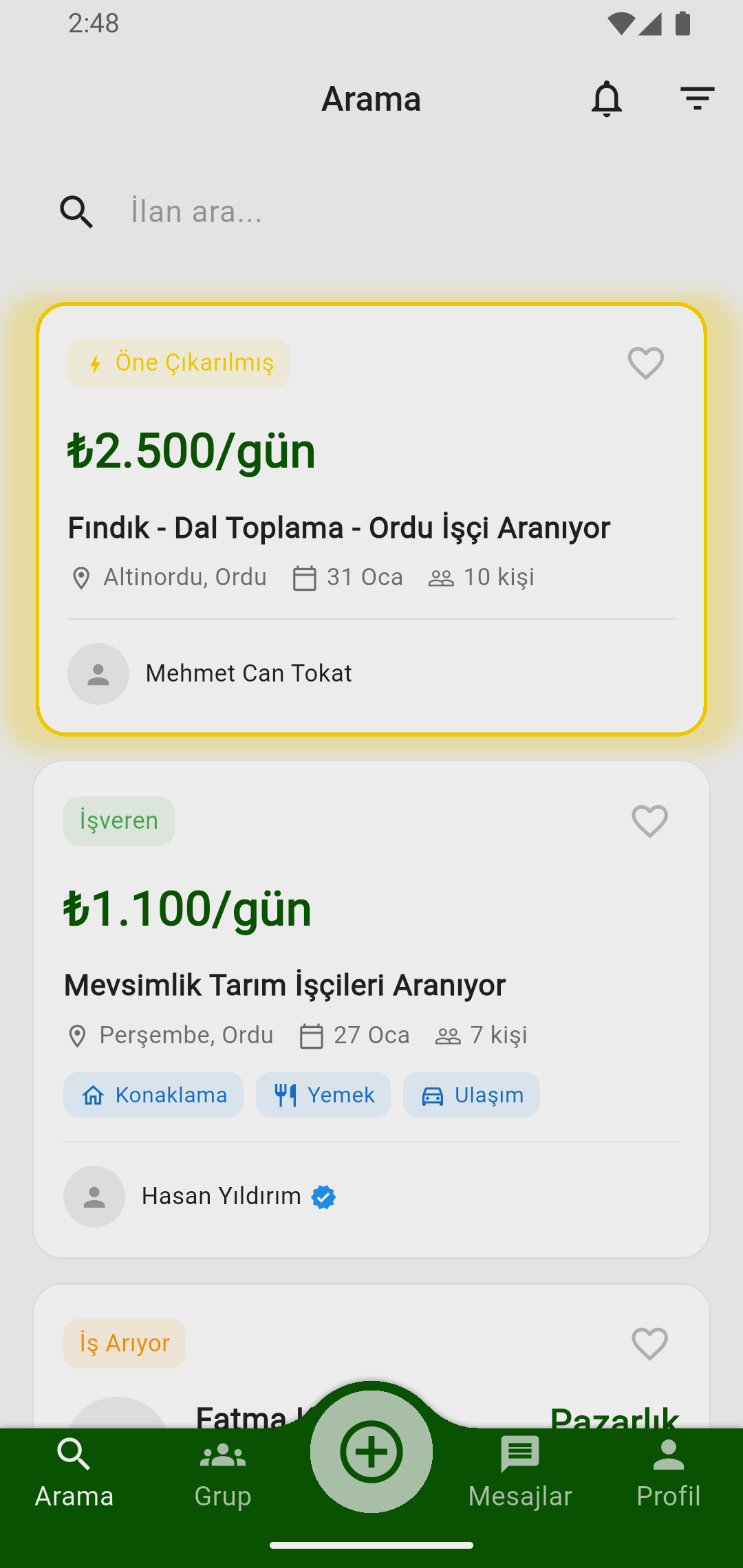
Findik is a listing and messaging platform that connects agricultural workers directly with the growers who need them, without a middleman. The grower posts how many workers are needed, on which dates and at what pay; the worker browses listings in their own region and applies directly. The app also lets crews form teams and helps growers find service providers such as threshers and hauliers.
Yes, it is free. Registering, posting a listing, applying to listings, messaging and building a team cost nothing, and we never take a commission from anyone. The only paid item is an optional in-app purchase that promotes your listing for a limited time. Listings without it are still shown normally in the results.
Findik runs on both Android and iPhone, and can be downloaded free from Google Play and the App Store. Shared listing and group links also open in a normal web browser, so you can view a listing someone sent you even without the app installed.
After installing the app you sign up with your phone number — there is no long form to fill in. You then choose in your profile whether you are a worker, an employer, or both. This role can be changed at any time, so the same account works if you hire pickers in August and look for pruning work in winter.
Usage is heaviest in the Black Sea hazelnut belt — Ordu, Giresun, Samsun, Trabzon, Sakarya, Düzce and Zonguldak — but the app is open across Türkiye. Listings are also posted for olives and citrus in the Aegean and Mediterranean, and for field crops in Central Anatolia and Çukurova. Alongside crop work there are livestock, beekeeping and fishery categories, and job types cover harvesting, pruning, cleaning, planting, irrigation and fertilising.
No. Listings, applications and messages all come from the server, so an internet connection is required. It works fine on mobile data and the listing feed is kept light so it still loads on a weak signal. Actions taken while you are offline are not saved, so make sure you have a connection when publishing a listing.
You can start account deletion from the Settings section inside the app, or use the account deletion page on our website. You enter your registered email address, receive a six-digit verification code, and once you confirm the code the account is permanently deleted. The action cannot be undone — deleted listings, applications and messages cannot be restored.
Filter the listing feed by province, district and job type, then open a listing that suits you. The detail page shows the pay, the date range, how many workers are wanted and whether accommodation, meals and transport are provided. If the terms work for you, tapping the apply button is enough; your application reaches the employer immediately and you can add a short message introducing yourself.
Every application carries a status: Pending, Messaged, Accepted, Rejected or Withdrawn. You can follow this on the My Applications screen. You also get a push notification when an employer accepts or rejects you. If an application stays Pending for a long time, a short polite message to the employer usually moves things along.
Yes, there is no limit on the number of applications. In seasonal work it is normal and sensible to apply to several listings so your calendar does not sit empty. However, abandoning a job after you have accepted it leaves the employer stranded and shows up in your reviews, so check that the dates do not overlap before you accept.
No. Findik does not process payments, hold money or pay wages; the platform only introduces the two sides. The amount, the payday and the payment method are agreed entirely between you and the employer. That is exactly why we recommend putting the daily rate, the payday and any deductions in writing in the in-app chat before you start work.
The employer ticks these three items separately when creating the listing. If accommodation is provided, the type is stated as well — tent, dormitory, room or house. For meals the employer can select breakfast, lunch, dinner or all meals. Checking these fields before you travel to another province is the simplest way to avoid an unpleasant surprise on arrival.
The app has a group feature. A crew leader creates a group, adds members with an invite code, and marks the crew as seasonal, daily or mixed. Once the group exists you can apply to listings as a team, so a fifteen-person crew is matched as one unit rather than one by one, and growers who need many hands find you directly.
No, and it is a clear warning sign. Findik never asks any user for money in return for finding work, applying, registering or getting priority. Anyone who claims to be a Findik representative and asks for a deposit, registration fee or commission is attempting fraud: do not send money and report it to [email protected]. Demanding a commission from users is also explicitly banned in our terms of service.
Tap the "+" button in the app and choose the "I am looking for workers" listing type. Then enter the job type (harvest, pruning, cleaning, planting, irrigation or fertilising), how many workers you need, the start and end dates, the pay and the pay unit — daily, hourly, total or negotiable. In the final step you tick whether you provide accommodation, meals and transport, and publish.
Three causes account for most cases: leaving the pay blank and marking it negotiable, a date range that has already passed, and a location that was not narrowed down to district level. Not stating how many workers you need also drives away the right candidates. If the listing is still quiet after you fix those, send us the link from the contact page and we will look at it with you.
A rough rule for hazelnut harvesting is two to three worker-days per decare, rising to about five on steep, stony ground. A 20-decare orchard therefore needs roughly 60 worker-days: six people to finish in ten days, or four people to finish in fifteen. Detailed tables are on our guide page for growers looking for workers.
If your orchard is over 20 decares and the harvest has to be finished quickly, a crew is safer: one conversation reaches many people and the crew leader runs the daily work. On smaller plots, hiring individually is cheaper and avoids the problem of housing a group. The app supports both — listings that ask for a crew can receive group applications.
The Applications section on your listing shows each applicant’s profile, experience and the reviews they received from previous employers. You can accept, reject, or message them first to confirm the dates and how many people will actually come. The candidate receives an automatic notification once you decide; leaving applications unanswered keeps people waiting and affects how you are rated.
An active listing can be edited from its detail page, archived once you have found workers, or finalised when the job is done. Archived, completed and cancelled listings can be reactivated later, so you do not have to write the same listing from scratch next season. Drafts you never published can be deleted outright.
Yes. There is an optional promotion feature with one-day, three-day and one-week options, and the current prices are shown on the in-app purchase screen. It is entirely optional: listings without promotion continue to appear normally, ordered by location and date. There is no hidden paid ranking behind the results.
First revise the listing: state the pay as a number, fix the dates, and tick the facilities you provide. If that does not help, widen your search and approach people yourself — jobseekers publish their own listings and crews maintain groups in the app. Labour gets scarce in the middle of the season, so where possible open your listing three to four weeks before harvest.
A service listing is what you publish when you want to offer work to growers using your own vehicle or machine. It is a separate category from job listings, shown in a different colour in the feed, and growers looking for machinery browse it directly. You create it from the "+" button by choosing the service option.
The app covers threshers (harvest machines), trucks, tractors, pickups and pack-animal transport. After choosing your equipment you can describe exactly what you do in the description field — trailer capacity, the daily throughput of your thresher, or the implements you attach to your tractor. Those details noticeably increase the number of enquiries you receive.
You choose the province and district you want to work in, so only requests within reach get through to you. With a tractor and trailer the economic service radius is usually 20 to 30 kilometres; beyond that, travel time and fuel eat the margin quickly. If you take work further away, price the travel separately rather than absorbing it.
When creating the listing you pick a pricing unit: daily, hourly, total (lump sum), per trip or negotiable. Per trip is common for haulage, hourly for threshing, and lump sum for tillage. Quoting an actual figure markedly increases the number of enquiries, while listings marked negotiable attract the least interest.
Growers who see your listing message you inside the app, and you get a push notification for every new message. You settle the scope, the date and the price in that conversation. Payment does not pass through the app — you collect directly from your customer, which is why it pays to leave the agreed amount and what it includes in writing in the chat.
Yes. One account can hold several listings of different types, so you can advertise your thresher while also looking for pickers for your own orchard. All of them are managed separately from the My Listings section of your profile, and each one can be edited or archived independently.
Your data is encrypted in transit over HTTPS/TLS and encrypted at rest, and the database is protected with row-level access rules. Passwords are never stored in plain text; they are hashed. We do not sell user data to third parties, and our privacy policy sets out item by item which data we collect and why.
The profile details other users see are your first name, last name, profile photo and rating. Unless you write your contact details into the listing text yourself, conversations run through in-app messaging. We recommend keeping communication inside the app: if a disagreement arises later, the message history is a record that works in your favour.
Use the report option on the listing detail page, or send the listing link to [email protected]. We review reports the same day and take down listings once the problem is confirmed. Listings for jobs that do not exist, with invented pay or misleading working conditions, are explicitly prohibited by our terms of service.
Do not send anything. Findik never asks users for a registration fee, a deposit or a job-finding commission, so anyone asking for money in our name is a fraudster. Report it to [email protected] with a screenshot of the conversation and we will close the account and remove the listings. As a general rule, never send money up front to someone you have not met.
Your profile details and photo, listings, applications, messages, notifications, group memberships, favourites and reviews are permanently deleted. For legal and technical reasons only transaction logs are kept for 90 days and database backups for 30 days. The deletion cannot be reversed, so note down anything you want to keep beforehand.
Publishing fake or misleading listings; harassing, threatening or discriminating against other users; sending spam; demanding a commission or deposit from users; impersonating someone else; and attempting to compromise platform security all lead to suspension or deletion. A large number of verified complaints from other users has the same effect.
No. Findik is designed for users aged 18 and over, and we do not knowingly collect personal data from anyone younger. Posting job offers aimed at people under 18 is explicitly forbidden by our terms of service. If you come across content like that, please report it to us.
Planning, source verification and the decision to publish rest with Ahmet Kaan Çelenk, the founder of Findik App. Every article shows the author name, the publication date and, where relevant, the date it was last updated. You can read the profile on our authors page and see how we work in full on our editorial policy page.
For verifiable facts such as subsidy amounts, application deadlines and regulation, we rely only on primary sources: the Official Gazette, the Ministry of Agriculture and Forestry, official e-Government service pages, the Hazelnut Research Institute and the national statistics office. Sources are listed with links at the end of each article, and we do not publish a claim we cannot source.
Send the article link together with the detail you believe is wrong to [email protected] or through the form on our contact page. We check the report against the primary source and normally reply within two working days. If the error is confirmed we correct the text and change the update date; if the whole claim is wrong we remove the content and explain why on the page.
No. The calculators are informational and produce estimates only. The amount that actually gets paid is always determined by the relevant official communiqué and the ministry’s own records, so a calculator result is not a commitment. For a figure specific to your own holding you need to apply to your provincial or district agriculture directorate.
No. Advertising revenue helps cover our costs but does not decide what we write about. When we mention a product or brand it is not the result of a commercial arrangement; if it were, we would say so in the article. Likewise, there is no hidden paid priority in how listings are ordered in the app.
Use the form on our contact page or write directly to [email protected]. We normally reply to email within 24 to 48 hours, though this can take longer at weekends and on public holidays. Blocking problems such as being unable to sign in are prioritised — just put "Urgent" in the subject line.
Quick Links
Still Have Questions?
If you couldn't find the answer, contact us. We're happy to help.